VeriCapture is NOT a "truth verification" tool. It records capture events — it does NOT guarantee content accuracy or legitimacy.
CPP v1.0 COMPLIANT • EVIDENCE GENERATION TOOL

VeriCapture

Evidence Generation Tool
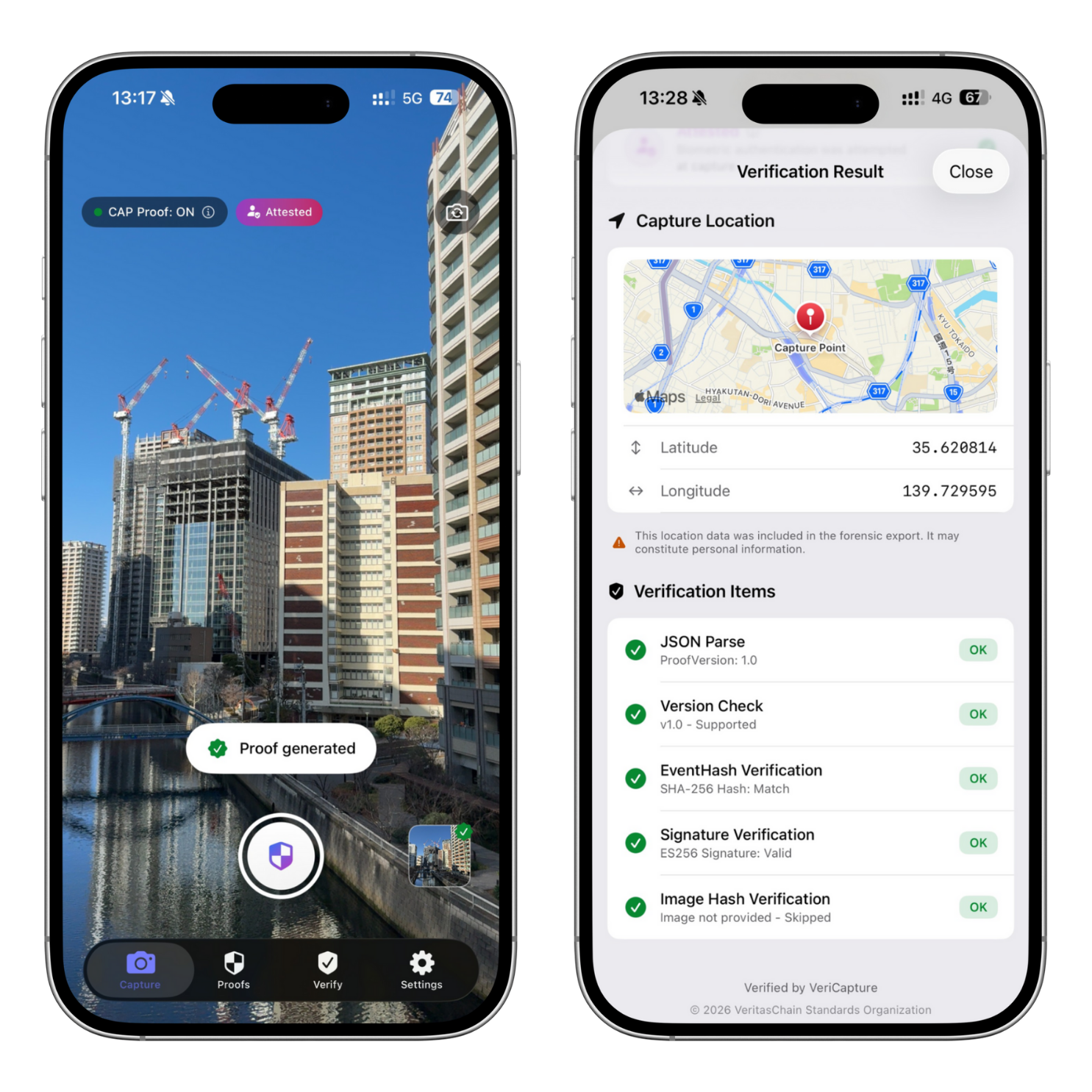
VeriCapture iOS App Mockup

"Record capture events and data provenance in a cryptographically verifiable manner."

What VeriCapture Records

  • The fact that a capture operation occurred
  • Provenance data (hash, timestamp, signature)
  • Tamper detection capability
  • Third-party independent verification

What VeriCapture Does NOT Provide

  • Truth verification of content
  • Legitimacy guarantee of subjects
  • Identity verification / personal authentication
  • Fake detection / anti-fake capability

Verify, Don't Trust.

— Mathematical verification, not trust-based assumptions

App Store Category

Utilities / Business — NOT in Photo & Video category. VeriCapture is a specialized professional tool, not a general consumer camera app.
Critical Understanding

Please read before using VeriCapture

Misconceptions to Avoid

  • "Captured with VeriCapture = Truth / Real"
  • "Verifiable = Legitimacy Guaranteed"
  • "Anti-fake / Deepfake Prevention App"
  • "Everyday camera app for everyone"

Correct Understanding

  • Records capture events cryptographically
  • Provides tamper-evident provenance data
  • Enables third-party independent verification
  • Professional evidence generation tool

The truth or legitimacy of captured content requires separate verification and investigation.
VeriCapture evidence should be used as one piece of supporting information in your judgment process.

Core Features

CPP v1.0 compliant evidence generation capabilities

Capture with Evidence Trail

Generate CPP-compliant evidence simultaneously with capture. SHA-256 hash, ES256 digital signature, RFC 3161 timestamp.

Cryptographic integrity from capture moment

VeriCheck Verification

Verify evidence integrity via QR scan, JSON import, or file selection. Detects tampering through hash and signature validation.

Third-party independent verification

Attested Capture Mode

Records biometric authentication attempt at capture time. NOT identity verification — only records that authentication was attempted.

Not personal identification

Evidence Pack Export

Complete evidence package for legal/audit submission: Image + Proof JSON + Verification Summary PDF with disclaimers.

Recommended for formal evidence submission

External Anchoring

RFC 3161 TSA timestamps and Merkle tree inclusion proofs. Third-party time authority for legal-grade timestamp evidence.

RFC 3161 compliant timestamps

Privacy by Design

Evidence data stored on-device only. External transmission limited to hash values only. No images or personal data transmitted.

Local-first architecture
INDUSTRY FIRST

World-First Innovations

The first general-consumer iOS camera application combining these cryptographic evidence capabilities in a single, unified tool.

World First

RFC 3161 TSA Direct Integration

First general-consumer iOS application to provide direct RFC 3161 Time Stamp Authority integration at the capture moment — not batch-processed later, but immediately at capture time.

Third-party trusted timestamp authority proves exact capture time

World First

Attested Capture Mode

First consumer camera application to record biometric authentication attempt at capture time — cryptographically bound to the evidence, recording that OS-level authentication was attempted.

Records authentication attempt — NOT identity verification

World First

Unified Cryptographic Stack

First consumer application combining SHA-256 + ES256 digital signatures + RFC 3161 timestamps + Merkle tree integrity logging with biometric attempt recording — all in a single capture workflow.

Complete evidence chain from capture to verification

Unique Philosophy

"Evidence Tool" — No Truth Claims

Explicitly designed as an evidence generation tool — the only consumer camera application that structurally refuses to claim truth verification, authenticity, or anti-fake capabilities.

Records facts, not judgments — verification requires separate investigation

"The first general-consumer iOS camera application combining cryptographic evidence generation (SHA-256, digital signatures, RFC 3161 third-party timestamps, Merkle tree integrity logging) with capture-time OS biometric authentication attempt recording (Attested Capture Mode) and explicit design as an evidence generation tool that does NOT claim to verify truth, authenticity, or identity."

— VeriCapture Technical Positioning, January 2026

View World-First Analysis Report

Detailed competitive analysis and claim defensibility assessment

Intended Use Cases

Professional evidence generation for specific industries

Primary Use Cases

Legal Submission

Evidence documentation for litigation and disputes

Audit Trail

Business process documentation and compliance records

Field Documentation

Construction sites, inspections, on-site work records

Journalism & Investigation

Interview records, research documentation

Real Estate & Construction

Property condition records, construction progress

Incident Documentation

Accident scenes, trouble situations, evidence preservation

NOT Intended For

Social Media Sharing

Evidence generation overhead unnecessary for casual sharing

Everyday Photography

Designed as specialized professional tool, not casual camera

Photo Sharing / Distribution

Privacy-sensitive data may be included in evidence

Art & Creative Work

No creative workflow features included

VeriCapture is a professional evidence tool, not a general consumer camera app. Use your device's standard camera for everyday photography.

Technical Specifications

CPP v1.0 compliant cryptographic architecture

Cryptographic Stack

Hash Algorithm SHA-256
Signature Algorithm ES256 (ECDSA P-256)
Key Storage Secure Enclave
Timestamp Protocol RFC 3161 TSA
JSON Canonicalization RFC 8785 (JCS)
UUID Version RFC 9562 (UUIDv7)

Application Details

Platform iOS 17.0+
Development Language Swift / SwiftUI
Specification Compliance CPP v1.0
App Store Category Utilities / Business
Data Storage On-device only
External Transmission Hash values only

Evidence Pack Structure

evidence_pack_{proofId}/
├── image.jpg                    # Original captured image
├── proof.json                   # Forensic Proof (complete evidence trail)
├── verification_summary.pdf     # Verification summary (with disclaimers)
└── README.txt                   # Evidence Pack explanation

# proof.json contains:
{
  "proofId": "...",
  "captureTime": "2026-01-16T18:30:45.123+09:00",
  "imageHash": "SHA-256 Base64",
  "eventHash": "SHA-256 Base64",
  "signature": "ES256 Base64",
  "publicKey": "PEM format",
  "location": { ... },           # Optional
  "device": { ... },
  "humanAttestation": { ... },   # Optional (Attested Capture Mode)
  "timestampResponse": { ... },  # RFC 3161 TSA response
  "merkleProof": { ... }         # Merkle inclusion proof
}
VERIFICATION ARCHITECTURE

3-Layer Tampering Detection

VeriCapture implements a comprehensive verification model that detects tampering at multiple levels.

1

Layer 1: Asset Integrity

Verifies the image file has not been modified since capture.

Image Data → SHA-256 → Computed Hash

proof.assetHash → COMPAREPASS / FAIL

Detects: Image modification, cropping, filters, compression changes

2

Layer 2: Event Integrity

Verifies the event metadata (timestamp, device info, settings) has not been altered.

rawEvent (Base64) → Decode → SHA-256 → Computed Hash

proof.eventHash → COMPARE

proof.signature → ES256 Verify → Valid Signature?

Detects: Metadata tampering, timestamp falsification, context changes

3

Layer 3: External Anchoring

Verifies the proof existed at the claimed time via third-party Time Stamp Authority.

proof.eventHash → Merkle Proof → Recomputed Root

proof.merkleRoot → COMPARE

proof.tsaResponse → RFC 3161 Verify → Valid Timestamp?

Detects: Backdated captures, proof fabrication, timestamp manipulation

VeriCheck & Chain Integrity Dashboard

Proof verification via QR, file, or JSON input — with complete chain integrity monitoring

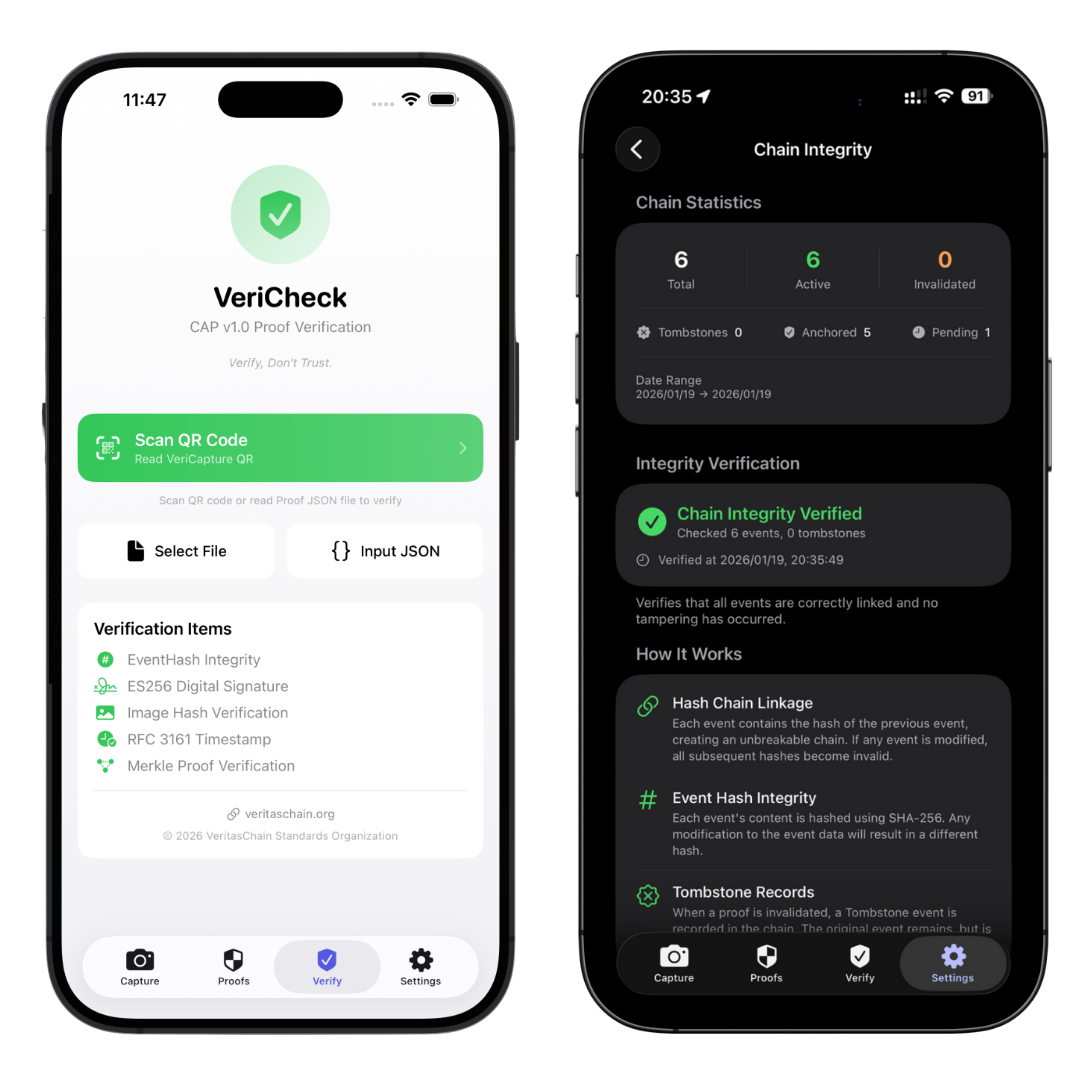
VeriCheck verification screen and Chain Integrity dashboard showing proof validation and chain statistics

VeriCheck (Left)

Validates proofs via QR scan, file import, or JSON input. Checks EventHash, ES256 signature, image hash, RFC 3161 timestamp, and Merkle proof.

Chain Integrity (Right)

Dashboard shows total events, active/invalidated status, anchor progress, and real-time chain verification with tamper detection.

CHAIN INTEGRITY

Hash Chain Verification

Every capture event is cryptographically linked to the previous one, creating an unbreakable chain that detects any insertion, deletion, or modification.

Hash Chain Architecture

Genesis

"GENESIS"

Event₁

prevHash: GENESIS

eventHash: hash₁

Event₂

prevHash: hash₁

eventHash: hash₂

Event₃

prevHash: hash₂

eventHash: hash₃

...

Verification Rule: For each event[n], verify that event[n].prevHash == event[n-1].eventHash

Event Hash Verification

Each event's content is re-hashed using SHA-256 and compared with the stored eventHash to detect any modification.

Chain Linkage Check

Verifies that each event's prevHash correctly references the previous event's eventHash, detecting insertions or deletions.

Tombstone Validation

Checks that all tombstone records correctly reference their target events, detecting orphaned or invalid invalidations.

Detectable Integrity Issues

Error Type Detection Method Implication
PREV_HASH_MISMATCH Compare prevHash with previous eventHash Chain break — possible insertion/deletion
EVENT_HASH_MISMATCH Recompute hash from canonical JSON Event content modified after creation
SIGNATURE_INVALID ES256 signature verification Forged event or corrupted signature
TOMBSTONE_TARGET_MISMATCH Compare tombstone target with actual event Tombstone points to different event version
ORPHANED_TOMBSTONE Look up tombstone target event ID Target event was illegally deleted
EVENT INVALIDATION

Tombstone System

"Delete ≠ Never happened. Delete = Record that deletion occurred."
VeriCapture's tombstone system ensures even invalidated events leave an immutable audit trail.

What is a Tombstone?

A Tombstone is a cryptographically signed record that marks an event as invalidated while preserving the complete audit trail. It is itself a blockchain-linked event.

  • Original event remains in the chain (read-only)
  • Tombstone records who, when, and why
  • Cryptographically bound via PrevHash linkage
  • Media can be deleted, but proof history persists

Supported Invalidation Reasons

User Privacy Request USER_PRIVACY_REQUEST
Accidental Capture USER_ACCIDENTAL_CAPTURE
Inappropriate Content USER_CONTENT_INAPPROPRIATE
Legal Court Order LEGAL_COURT_ORDER
GDPR Erasure Request LEGAL_GDPR_ERASURE
Integrity Compromised SYSTEM_INTEGRITY_COMPROMISED

User Delete Options

Delete Photo Only

Deletes the image file while preserving the cryptographic proof. The event remains verifiable; only the visual content is removed.

Media: Deleted Proof: Preserved Chain: Intact

Invalidate Proof

Creates a Tombstone record marking the event as invalidated. Original event remains read-only; the chain records the invalidation.

Media: Optional Proof: Invalidated Chain: Extended

Important: Complete deletion of events is intentionally forbidden. This ensures the audit trail remains tamper-evident even under pressure to "make evidence disappear."

Self-Signing Model Limitations

Understanding the "I signed myself" constraint

CPP uses a self-signing model, which has inherent limitations:

  • The signing key manager's identity is outside CPP's scope
  • Device key only proves "signed on this device" — not who signed
  • Photographer identity or organizational affiliation is not guaranteed

For Enterprise Use

Organizations using VeriCapture should establish separate policies for: key issuance procedures, device-user binding records, key revocation processes, and audit trail retention.

About "Attested Capture Mode"

Why we don't use "Verified"

We deliberately use "Attested" instead of "Verified" because:

  • "Verified" is easily misunderstood as "truth / correctness / identity confirmation" in many contexts
  • B2B customers may misuse "Verified" in sales materials claiming truth guarantees
  • End users may misinterpret "Verified" as "identity confirmed"

What Attested Capture Records:

  • • Authentication was attempted (not necessarily successful)
  • • Success/failure result cryptographically bound to capture event
  • • Time offset between authentication and capture

What Attested Capture Does NOT Prove:

  • • Who the photographer is
  • • Whether the photographer is the device's legitimate owner
  • • Whether a human (not a bot) performed the capture

Related Resources

Specifications and documentation

Contact

For inquiries about VeriCapture, CPP specification, or enterprise licensing